Google’s Gemini AI app is a constant top three iPhone app in the App Store. Starting today, Gemini is available as a dedicated Mac app as well. This makes macOS the first platform with a desktop Gemini AI app.

Gemini Mac app includes a keyboard shortcut for instant access
Before now, proper Gemini access on the Mac has only been available through the Chrome browser or Gemini on the web.
The official Gemini Mac app should offer a substantially improved experience. This starts with instant access with the keyboard shortcut Option + Space.

The Mac app also includes great tools like sharing your screen for better context, configurable menu bar and Dock access, and much more:
- Customizable Shortcuts: Press Option + Space to open the mini chat, or Option + Shift + Space for the full chat experience. You can change both shortcuts in Settings.
- Menu Bar: Select the Gemini icon located in the menu bar at the top of your screen.
- Application Dock: Launch the app directly by clicking its icon in the Dock.
Gemini is a ‘100% native Swift’ app
More customization options include the ability to open new chats in mini chat or the main window, resetting mini chat based on a time duration, and selecting from one of several voices for voice-read responses.
Gemini for Mac is also a “100% native Swift” app, meaning it is developed specifically for Apple’s platform.
Google highlights several key features of Gemini for Mac:
- Get quick answers: Instantly ask questions and get information without opening a browser.
- Draft content: Generate ideas, write emails, craft documents, or create engaging social media posts.
- Summarize information: Quickly get the main points from long articles, web pages, or documents.
- Brainstorm ideas: Use Gemini as a creative partner to explore new concepts and generate innovative solutions.
- Get coding help: Write code, debug, or understand complex programming concepts in various languages.
- Analyze images: Upload images and ask Gemini questions about them, or use them to spark new ideas.
Google says “more features are on the way” as well.
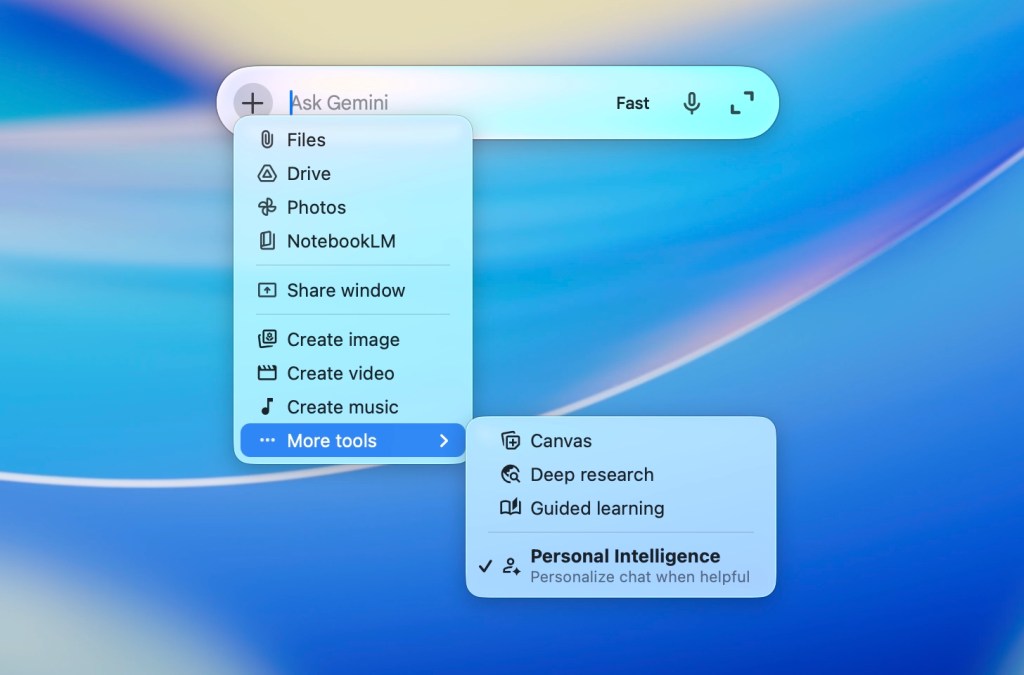
Here’s a look at the quick access input menu, as well as some of the sub-menu options:
You can download Gemini for Mac for free here. It runs on macOS 15 Sequoia or higher.
Gemini will power upgraded Siri and Apple Intelligence
Beyond the new Mac app, Google’s Gemini is set to power upgraded Siri and Apple Intelligence features, starting with iOS 27 and macOS 27 later this year. We’ll learn more about those at WWDC 2026, starting June 8.
Apple first unveiled Apple Intelligence as part of iOS 18 at WWDC 2024 on June 10, 2024. Apple rolled out most of the Apple Intelligence suite of features in iOS 18.1, iOS 18.2, iOS 18.3, and iOS 18.4.
Personal Intelligence, however, never made the iOS 18 release cycle. Neither did the kind of in-app action and on-screen awareness features that Apple originally announced.
Apple officially delayed its “more personalized” version of Siri one year ago on March 7, 2025.
Then on January 12, 2026, Apple and Google made a joint announcement that the two companies were collaborating on a Gemini-powered upgrade to Siri and Apple Intelligence:
“Apple and Google have entered into a multi-year collaboration under which the next generation of Apple Foundation Models will be based on Google’s Gemini models and cloud technology. These models will help power future Apple Intelligence features, including a more personalized Siri coming this year.
After careful evaluation, Apple determined that Google’s Al technology provides the most capable foundation for Apple Foundation Models and is excited about the innovative new experiences it will unlock for Apple users. Apple Intelligence will continue to run on Apple devices and Private Cloud Compute, while maintaining Apple’s industry-leading privacy standards.”
Apple is expected to unveil a proper Siri app for iPhone, iPad, and Mac as part of the new system.


FTC: We use income earning auto affiliate links. More.

